03: Events and Input
Every interactive app needs two things: a stream of events ("key pressed", "mouse moved", "window resized") and a way to poll current state ("is W held right now?"). The vneevents library provides both — typed event classes, a thread-safe queue, an EventManager singleton, and a static Input API.
The vnetestbed 01_test_events sample demonstrates the full pipeline with a real GLFW window and ImGui panels. Running it is the fastest way to see everything working before you write any integration code.
Quick Start
#include <vertexnova/events/events.h>

using namespace vne::events;

// 1. Implement a listener
class MyListener : public EventListener {
public:
    void onEvent(const Event& event) override {
        if (event.type() == EventType::eKeyPressed) {
            auto& e = static_cast<const KeyPressedEvent&>(event);
            // e.keyCode(), e.modifiers()
        }
    }
};

int main() {
    auto& manager = EventManager::instance();

    // 2. Register
    auto listener = std::make_shared<MyListener>();
    manager.registerListener(EventType::eKeyPressed, listener);

    // 3. Push events (typically from window callbacks, not hardcoded)
    manager.pushEvent(std::make_unique<KeyPressedEvent>(KeyCode::eA));
    manager.pushEvent(std::make_unique<MouseMovedEvent>(100.0, 200.0));

    // 4. Process — dispatches queued events to all listeners
    manager.processEvents();

    // 5. Poll input state
    if (Input::isKeyPressed(static_cast<int>(KeyCode::eW))) { /* move forward */ }
    auto [mx, my] = Input::mousePosition();

    // 6. Advance frame — updates "just pressed" / "just released" state
    Input::nextFrame();

    return 0;
}
| Piece | What it does |
|---|---|
EventListener | Interface; override onEvent(const Event&) to handle events. |
EventManager::instance() | Singleton. Owns the queue and dispatcher. |
registerListener(type, ptr) | Subscribe a listener to one event type. |
pushEvent(unique_ptr<Event>) | Enqueue an event (thread-safe). Typically called from window/input callbacks. |
processEvents() | Drain the queue and call onEvent on every registered listener. Call once per frame. |
dispatchImmediate(event) | Bypass the queue — dispatch to listeners right now, synchronously. |
Input::isKeyPressed(int) | Returns true while the key is held. Pass static_cast<int>(KeyCode::eW). |
Input::nextFrame() | Resets "just pressed" / "just released" state. Call at the end of each frame. |
Event types
Keyboard
| Class | EventType | Accessors |
|---|---|---|
KeyPressedEvent | eKeyPressed | keyCode(), modifiers() |
KeyReleasedEvent | eKeyReleased | keyCode(), modifiers() |
KeyRepeatEvent | eKeyRepeat | keyCode(), repeatCount() — fires repeatedly while a key is held |
KeyTypedEvent | eKeyTyped | keyCode() — use this for text input, not KeyPressedEvent |
modifiers() returns a bitmask of ModifierKey flags: eModShift, eModCtrl, eModAlt, eModSuper, etc.
Mouse
| Class | EventType | Accessors |
|---|---|---|
MouseButtonPressedEvent | eMouseButtonPressed | button() (MouseButton::eLeft/eRight/eMiddle), modifiers() |
MouseButtonReleasedEvent | eMouseButtonReleased | button(), modifiers() |
MouseMovedEvent | eMouseMoved | x(), y() (double, screen coords), modifiers() |
MouseScrolledEvent | eMouseScrolled | xOffset(), yOffset() |
Window
| Class | EventType | Accessors |
|---|---|---|
WindowResizeEvent | eWindowResize | width(), height() (uint32_t) |
WindowCloseEvent | eWindowClose | none — signals the app should quit |
Touch
| Class | EventType | Accessors |
|---|---|---|
TouchPressEvent | eTouchPress | touchId(), x(), y() |
TouchMoveEvent | eTouchMove | touchId(), x(), y() |
TouchReleaseEvent | eTouchRelease | touchId(), x(), y() |
Input polling
Call these anywhere in your frame loop. All methods are static and thread-safe.
// Keyboard
Input::isKeyPressed(static_cast<int>(KeyCode::eEscape));      // true every frame the key is held
Input::isKeyJustPressed(static_cast<int>(KeyCode::eSpace));   // true on the first frame only
Input::isKeyJustReleased(static_cast<int>(KeyCode::eSpace));  // true on the release frame only

// Mouse buttons
Input::isMouseButtonPressed(static_cast<int>(MouseButton::eLeft));
Input::isMouseButtonJustPressed(static_cast<int>(MouseButton::eLeft));

// Position and scroll
auto [x, y]          = Input::mousePosition();  // std::pair<int, int>
auto [sx, sy]        = Input::mouseScroll();    // std::pair<float, float>
auto [width, height] = Input::windowSize();

// Call once at the end of each frame
Input::nextFrame();
isKeyPressed is true every frame the key is down. isKeyJustPressed fires only on the first frame — use it for actions that should trigger once per press (jump, toggle, shoot).
The Input state is updated by your window backend (GLFW callbacks or equivalent) calling Input::updateKeyState, Input::updateMousePosition, etc. before processEvents.
Per-frame pipeline
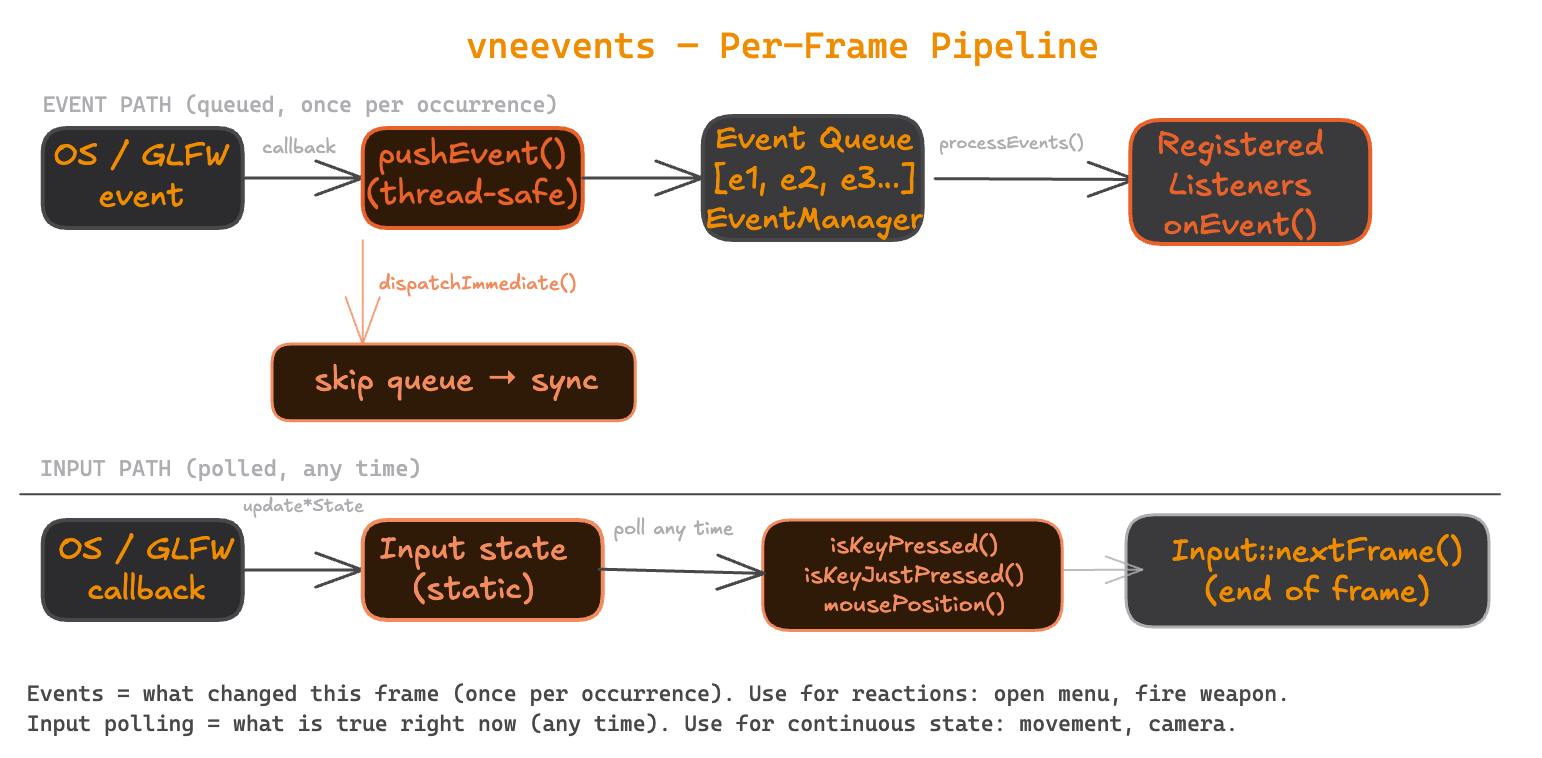
Per-frame loop
while (running) {
    // Window library polls OS events → GLFW callbacks fire → push into EventManager + update Input state
    glfwPollEvents();

    // Drain queue → registered listeners get onEvent()
    EventManager::instance().processEvents();

    // Poll current state for movement, camera, etc.
    if (Input::isKeyPressed(static_cast<int>(KeyCode::eW)))        move_forward();
    if (Input::isKeyJustPressed(static_cast<int>(KeyCode::eEscape))) running = false;

    render();

    Input::nextFrame();
}
Events and polling are complementary: events tell you what changed this frame (one call per occurrence); polling tells you what is true right now (call any time). Use events for reactions (open menu, fire weapon); use polling for continuous state (movement, camera rotation).
EventManager reference
| Method | Notes |
|---|---|
registerListener(EventType, shared_ptr<EventListener>) | Listeners are held as shared_ptr — keep your listener alive as long as it's registered. |
unregisterListener(EventType, const EventListener*) | Removes the listener for that event type. |
pushEvent(unique_ptr<Event>) | Thread-safe. Can be called from any thread. |
processEvents() | Not thread-safe — call from your main/render thread only. |
dispatchImmediate(const Event&) | Skips the queue; calls onEvent synchronously on all listeners for that type. |
pendingEventCount() | Number of events waiting in the queue. |
clearPendingEvents() | Discard all queued events without dispatching. |
Event categories
Every event reports a categoryFlags() bitmask. Use it to filter by category without checking individual types:
void onEvent(const Event& event) override {
    if (event.categoryFlags() & EventCategory::eKeyboard) {
        // handles KeyPressed, KeyReleased, KeyRepeat, KeyTyped
    }
}
| Flag | Covers |
|---|---|
eInput | All input events (keyboard, mouse, touch) |
eKeyboard | Key pressed, released, repeat, typed |
eMouse | Mouse moved, scrolled |
eMouseButton | Mouse button pressed, released |
eTouchScreen | Touch press, move, release |
eWindow | Window resize, close |
See it in vnetestbed
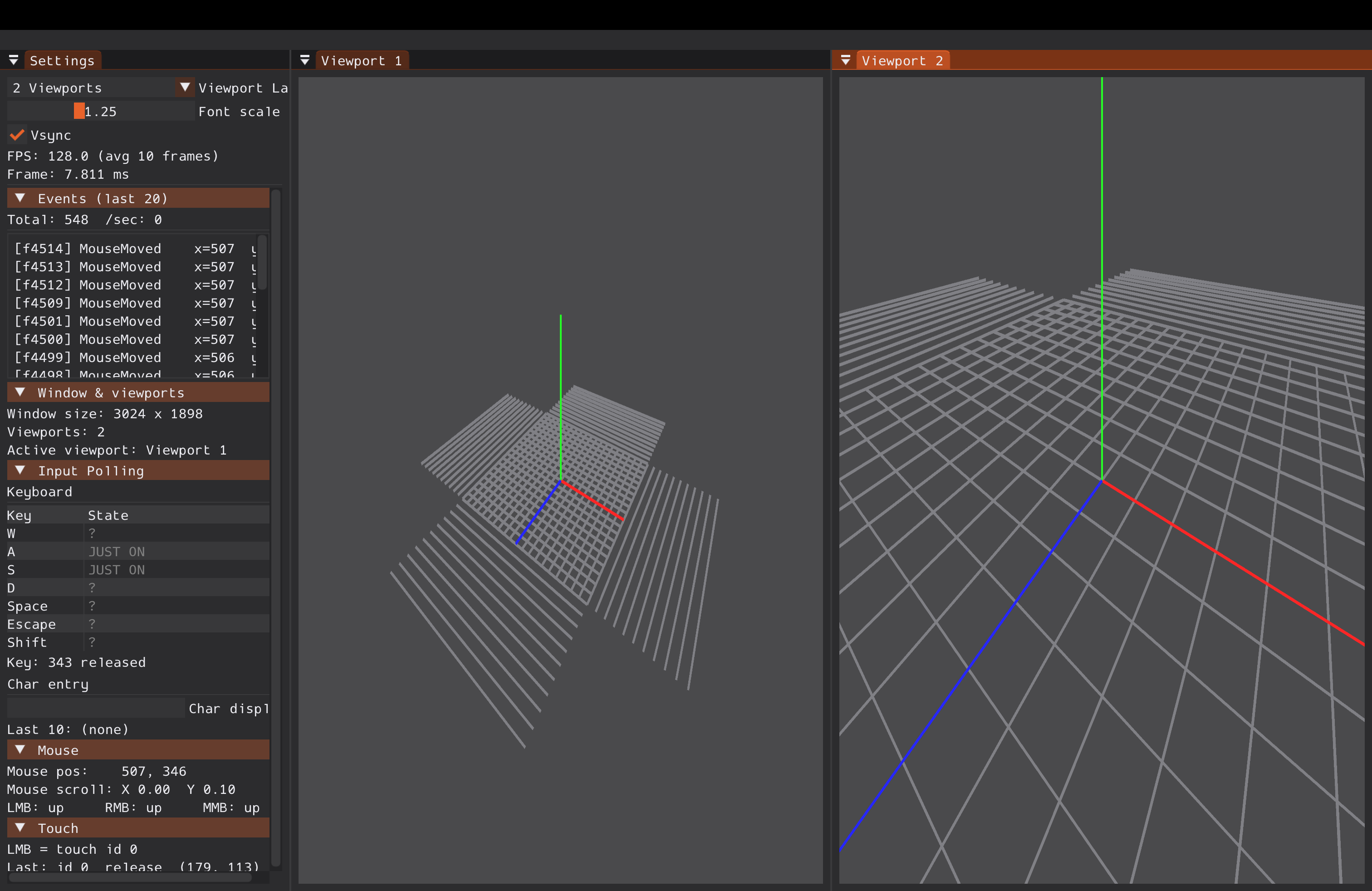
The 01_test_events sample is the reference integration: GLFW callbacks push vneevents events into the queue; the app's frame loop calls processEvents; ImGui panels show the live event stream and polled input state. It also emulates touch from the left mouse button (touch id 0) so you can test touch events on desktop.
git clone --recursive https://github.com/vertexnova/vnetestbed.git
cd vnetestbed
cmake -B build -DVNE_TESTBED_SAMPLES=ON
cmake --build build
Run (see the repo README for the exact binary path on your platform):
./build/bin/samples/sample_01_test_events
Press keys, move the mouse, scroll, resize the window. The Events panel logs each event with type and data. The Input Poll panel shows live held-key and cursor state. Exit with ESC or by closing the window.
Full details: vneevents README · vnetestbed README · sample README.
Next: See the Learn index for what's coming — windowing, rendering, and more.